Installation
Prerequisites
- WordPress 6.0+ (tested up to 6.7)
- WooCommerce 3.0+ (tested up to 9.x)
- PHP 7.4+
- A VayaPin API key — generate one in the VayaPin dashboard under Developer → VayaCore → API Keys & BYOK (dashboard.vayapin.com/vayacore). The free Starter tier includes 50 conversions / month, no credit card required. See Get your API key for the steps.
1. Install the plugin
You have three options.
From WordPress.org (recommended once live)
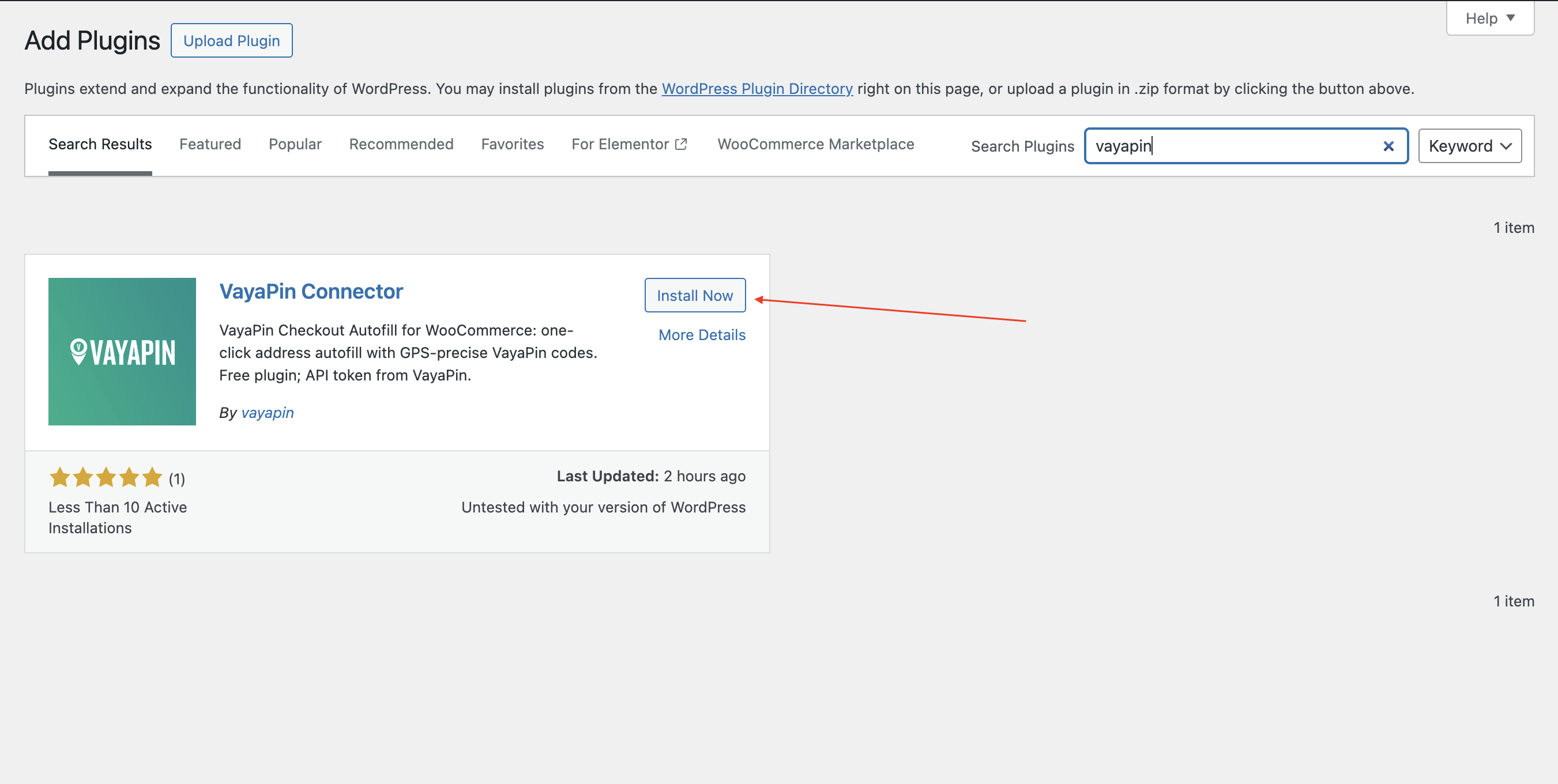
- In WP admin go to Plugins → Add New.
- Search for VayaPin.
- Click Install Now → Activate.
From a zip package
- Go to Plugins → Add New → Upload Plugin.
- Pick the
vayapin.zipwe provided and click Install Now. - Click Activate Plugin.
Manual SFTP
- Upload the
vayapin/folder to/wp-content/plugins/. - Go to Plugins in WP admin and click Activate next to VayaPin.
2. Activate WooCommerce
VayaPin requires WooCommerce. If you don't already have it active, install WooCommerce 3.0+ before continuing — the VayaPin admin menu only appears when Woo is active.
3. Connect to the VayaPin API
- In WP admin click the top-level Vayapin menu in the left sidebar. You'll land on Settings with the Connection tab active.
- Paste your API key.
- Choose Production or Sandbox.
- Click Save settings, then Run Connection Test in the Test Connection section. The status indicator should switch to Verified.
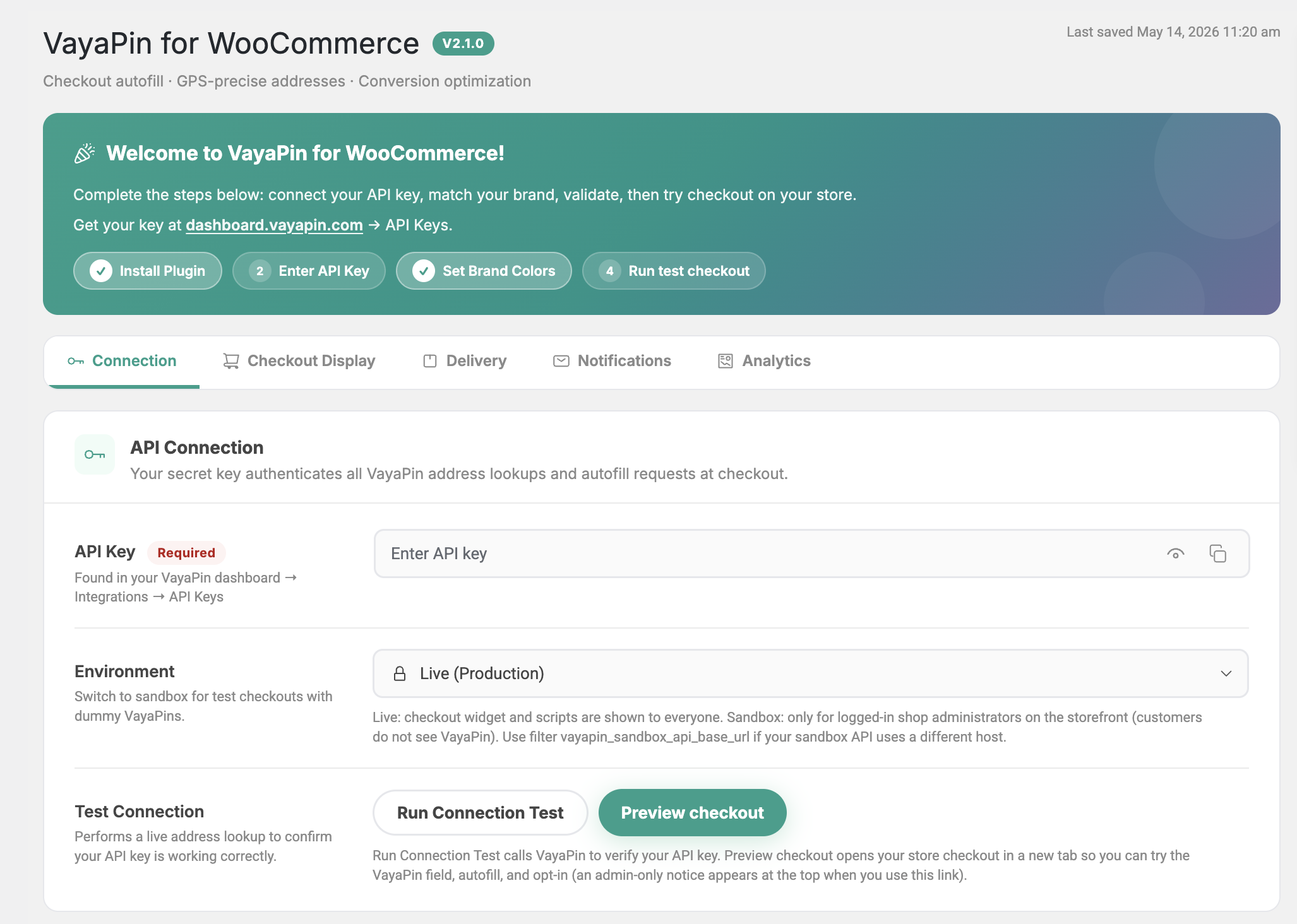
See Connection tab for what each field does.
4. Verify checkout integration
- Open your live storefront and add a product to the cart.
- Go to checkout and confirm the VayaPin code field is visible above the address fields.
- Enter a valid VayaPin code (use a test code in Sandbox).
- Confirm the address fields autofill.
- Complete a test order and open it in WooCommerce → Orders. Confirm GPS coordinates and entrance data appear in the VayaPin delivery metabox.

5. (Optional) Configure webhooks
- To receive address updates from VayaPin (VayaConnect
pin.address_updatedevents), register your store's webhook in the VayaPin dashboard — see Connect the VayaPin webhook. - To forward the plugin's own events (for example a VayaPin created at checkout) to an external system, set a URL and secret in the Notifications tab.
External services
This plugin uses the VayaPin API to resolve codes and related address or profile data during checkout and admin flows.
| Service | VayaPin API |
| Endpoint | https://api.vayapin.com/v1/ |
| Terms | VayaPin Terms of Use |
| Privacy | VayaPin Privacy Policy |
Data sent to VayaPin is limited to what is needed to authenticate and to perform lookups or actions you enable. You must use a valid API token. Describe data flows accurately in your privacy policy.