Notifications tab
Path: Vayapin → Settings → Notifications
Configure the outgoing webhook: the plugin POSTs a signed JSON event from your store to an endpoint you choose (an ERP, a fulfilment tool, an automation service) — for example when a VayaPin is created at your checkout.
This is not where VayaPin sends address updates to your store. Those arrive as VayaConnect pin.address_updated events on https://yourstore.com/wp-json/vayapin/v1/webhooks, with their own secret generated in the VayaPin dashboard — see Connect the VayaPin webhook.
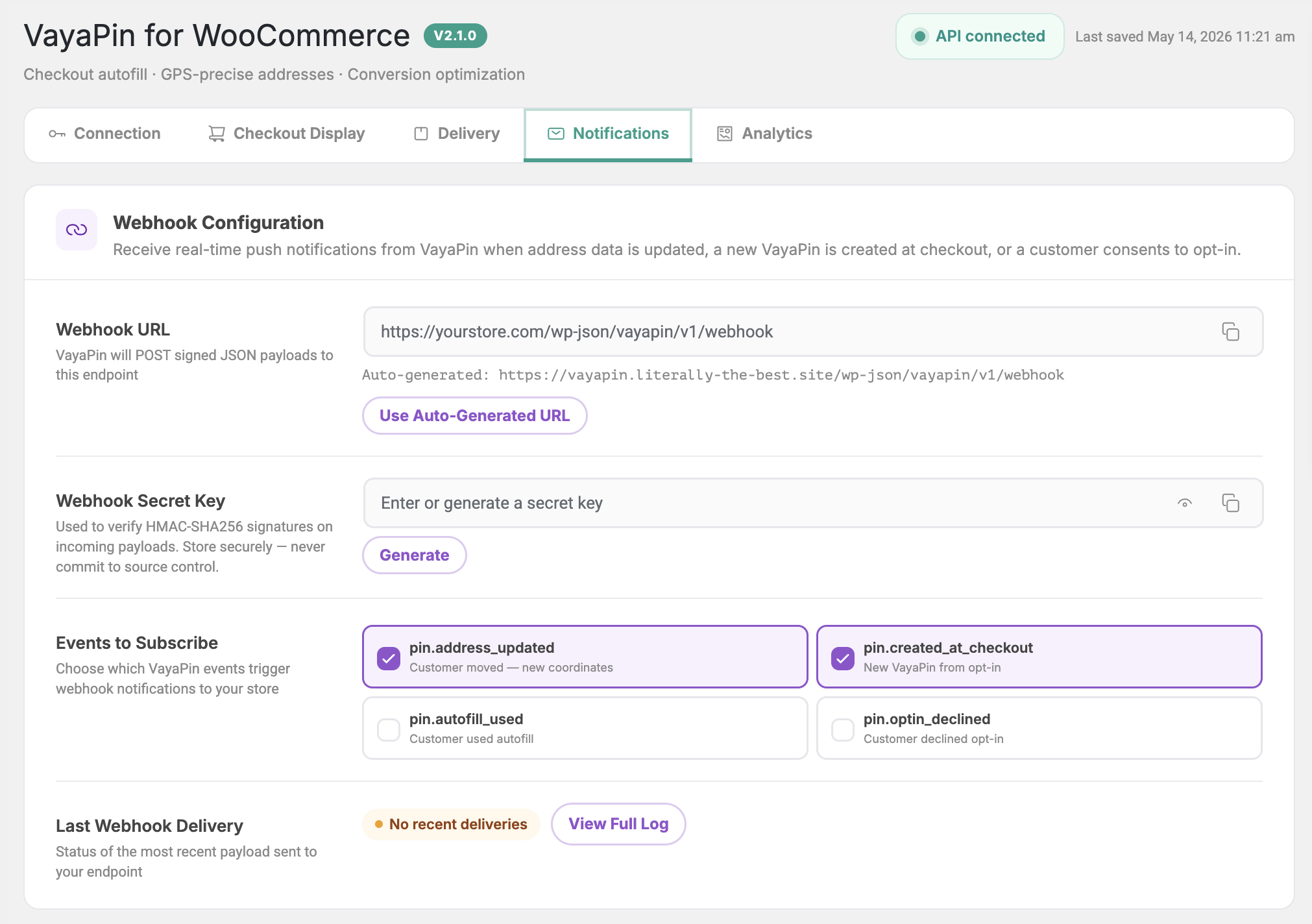
Webhook Configuration
Receive real-time push notifications from VayaPin when address data is updated, a new VayaPin is created at checkout, or a customer interacts with the opt-in.
Webhook URL
The endpoint the plugin POSTs events to. It must be an HTTPS URL that answers with a 2xx status; anything else is logged as a failed delivery.
- Enter the URL of the system that should receive the events. You are responsible for verifying the signature (see below) and routing the events there.
- Use Auto-Generated URL fills in
https://yourstore.com/wp-json/vayapin/v1/webhook— a path on your own store. The plugin doesn't register a handler at that path, so only use it if you add one yourself. - Don't enter the VayaConnect receiver (
…/vayapin/v1/webhooks) here: it only accepts events signed by VayaPin with the VayaConnect secret.

Webhook Secret Key
A shared secret the plugin uses to sign every outgoing webhook. Each request carries an X-VayaPin-Signature header with the HMAC-SHA256 hex digest of the raw JSON body, keyed with this secret, plus X-VayaPin-Event and X-VayaPin-Timestamp headers. Your endpoint should recompute the digest and reject requests that don't match.
- Click Generate to create a strong random secret.
- Or paste your own (minimum 32 chars recommended).
- After changing the secret, update it in the receiving system too. It is not entered in the VayaPin dashboard — that dashboard generates the separate VayaConnect webhook secret used for incoming address updates.
Treat the webhook secret like a password. Never commit it to source control or share it in support tickets.
Events to Subscribe
Tick the events your store cares about. Unchecked events are dropped at the VayaPin side and never sent.
| Event | When it fires |
|---|---|
pin.address_updated | A customer updates their VayaPin profile (address, entrance photo, instructions) — their next order on your store can reflect the change. |
pin.created_at_checkout | A new VayaPin was created on your checkout via the opt-in flow. |
pin.autofill_used | An existing VayaPin was successfully resolved and used to autofill the checkout. |
pin.optin_declined | A customer left the consent checkbox unticked at checkout. |

Last Webhook Delivery
A read-only mini-card showing the most recent webhook delivery — its timestamp, status pill, and the HTTP response code your endpoint returned.
For the full searchable history (events, statuses, retries) see the Webhook Logs page. The View Full Log link in this section opens it directly.
